
Peach Web Is Here
No install. No app store. No registration. Just Peach.
Most Bitcoin exchanges start on desktop and bolt on a mobile app later. We did the opposite. Peach was mobile-first from day one, because buying and selling Bitcoin should be as natural as splitting a dinner bill: post an offer to sell sats at the table, settle the fiat when the check arrives. No desk required.
That hasn't changed. But we're expanding the UX possibilities.
As the community grew, so did how you trade. Some of you manage a handful of offers, watch spreads, compare markets, run arbitrage… That kind of work wants a bigger screen. So today we're launching Peach Web: the full Peach marketplace, right in your browser.
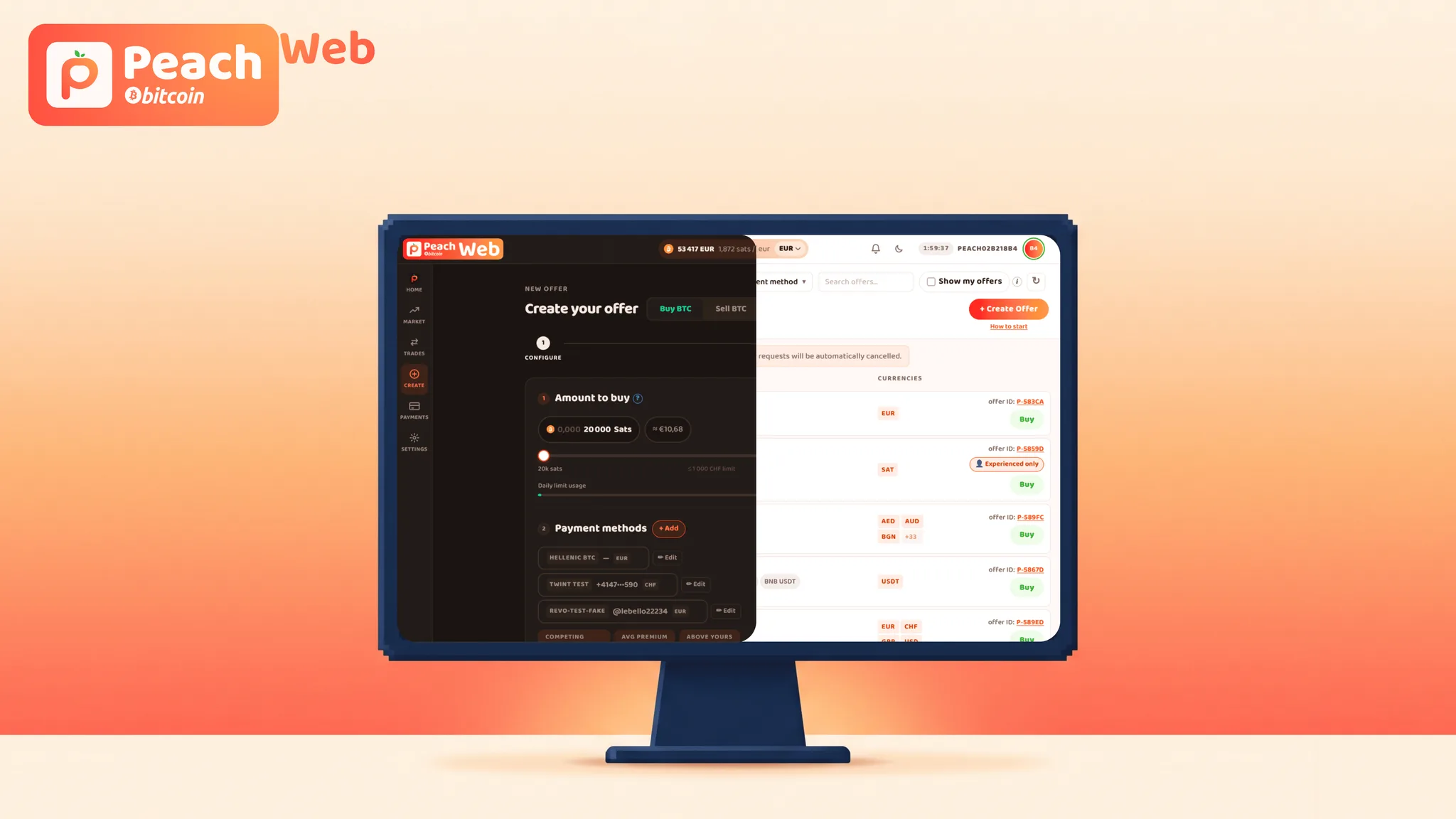
The full marketplace, no download
Open web.peachbitcoin.com and you're in. Browse offers, create and take them, chat with your trade partner, check reputation and history. No install, no app store, no waiting. It runs the same on Windows, Mac, Chromebook, or Linux, because it runs in the browser.
This also quietly solves an old headache. Our iOS app lived on TestFlight because Apple never allow us past it. Veteran Bitcoiners shrugged and dealt with it. Newcomers found it confusing. Peach Web removes that wall entirely, and we're adding the Peach Wallet app to the App Store too, so iPhone users have a simple, familiar way in.
Your phone still holds the keys
Here's the part that matters: Peach Web does not touch your private keys. Ever. Your phone stays your security hub. You log in by scanning a QR code with the mobile app (no passwords, nothing to remember), and every action that actually moves Bitcoin (funding escrow, releasing it, confirming payment) gets physically confirmed on your phone. Your seed phrase and keys never leave the device they live on. That's not a limitation, it's the design. Not your keys, not your coins, on every screen.
Web and Wallet, working in tandem on iPhone
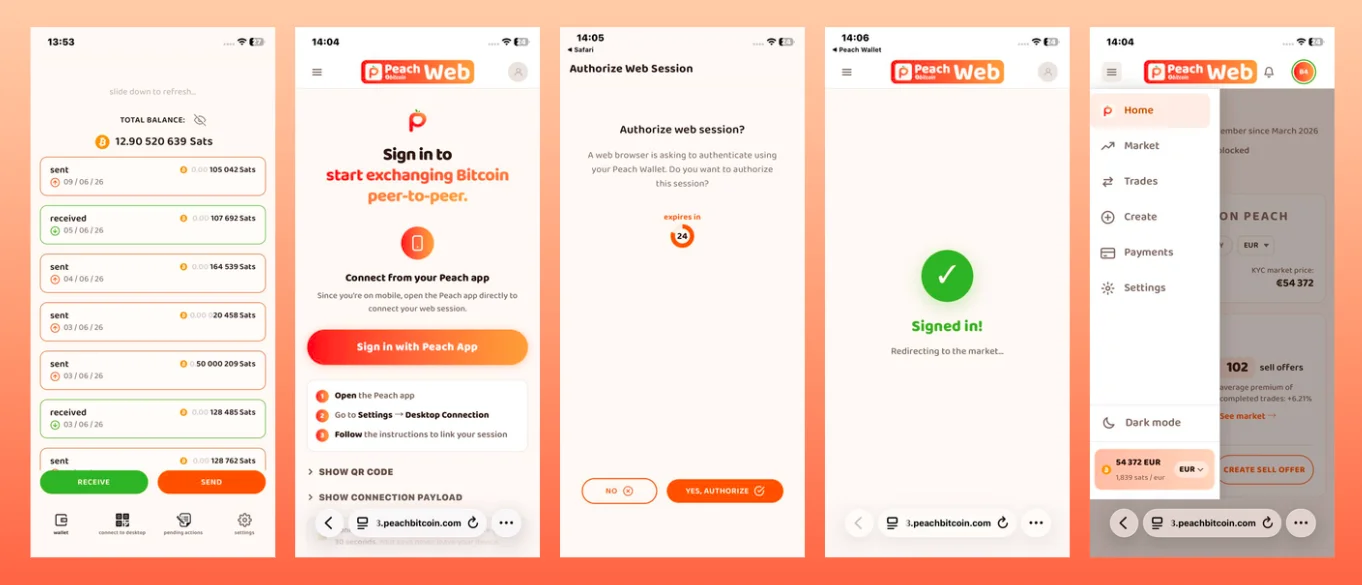
As mentioned above, if you're on iOS, no more TestFlight (if you want). The combo that changes everything: run the marketplace in Peach Web in your mobile browser, and let the new PeachWallet, a stripped-down version of the classic Peach App, do the signing on your phone. Signing should be quite seamless. Every action that requires signatures will auto-navigate to PeachWallet to sign. Get familiar with pending actions.
WebApp screen for browsing and managing offers, App Store app signing and holding the keys.
Authentication on iOS is as follows:
- have PeachWallet installed and ready (don't freak out at the screenshot, these are fake test coins ;) );
- go to web.peachbitcoin.com on your favorite browser, tap sign-in;
- confirm in app;
- Boom, you are ready. Try it out and let us know if it feels comfy enough!
Desktop for focus, mobile for speed
We think the two surfaces do different jobs, and that's the whole point.
Desktop is where you slow down. Research, compare, learn, make your first trade with a clear head. It's calm, and that calm is worth a lot when you're new to Bitcoin.
Mobile is where you move. Catch a notification, accept an offer while the coffee's brewing, check the market from wherever you happen to be standing.
Sometimes you're studying spreads on a big screen. Sometimes you're taking an offer with one thumb. Peach now supports both: focus and movement, conviction and action. Desktop is your power surface. Mobile is the companion that travels with you.
Getting started takes a minute
- Open web.peachbitcoin.com on your computer.
- In the mobile app, go to Settings > Connect to desktop > Scan QR code and allow camera access.
- Scan the code on screen. It refreshes every 30 seconds on purpose: a short window means a tighter lock on your login.
- You're in for a 2-hour session, then a fresh scan keeps things secure.
New here? Make a backup first (Settings > Backup in the mobile app). And remember, backups are created and restored from your phone only, because that's where your keys belong.
The vision is the same as it always was: make buying and selling Bitcoin as simple as possible, wherever you are, without giving up ownership or privacy. We're just giving you more room to do it.
Happy peaching 🍑
Final Notes
If you want to know more about Peach features, or read some of our other articles, you can find them here!
How to buy Bitcoin P2P with Peach
New to Peach? How to Build Your Reputation Fast
What is GroupHug and how does it save you fees?
Trading Bitcoin at meetups with Peach
If you want to know more about us, check out our socials, or simply contact us (use our PGP key if possible) we'll be happy to hear from you!
Telegram, Discord, Twitter, Instagram
Keep spreading the Peach word, who knows when you'll find the match of your life!
June 11st, 2026